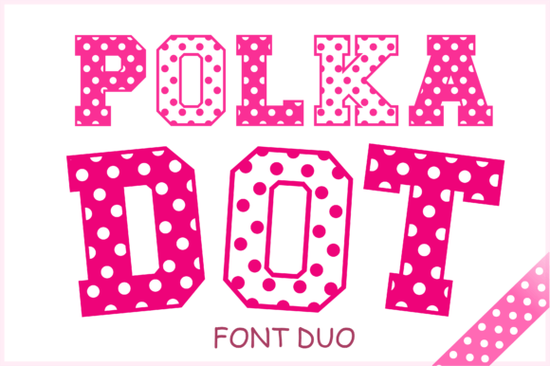
If you're looking for a typeface that instantly brings energy and playfulness to a design, the Polka Dot Duo Font is worth a closer look. This bubbly font set features two styles packed with playful polka dots, making it a natural fit for birthday invitations, baby shower decor, children's books, and product packaging aimed at younger audiences. Unlike many novelty typefaces that sacrifice readability for style, this one keeps letterforms bold and clear so your message actually lands.
What makes the Polka Dot Font Duo stand out?
Plenty of decorative fonts look fun but fall apart when you try to use them at smaller sizes or in print. The Polka Dot Duo Font was designed with real-world use in mind. The polka dot pattern is consistent across every letter, number, and symbol, which means your finished piece looks polished rather than patchy.
It includes a complete character set uppercase, lowercase, numbers, and punctuation so you won't run into missing glyphs halfway through a project. Having two styles in one download also gives you more flexibility without needing to hunt for a matching companion font.
Where does this font work best?
This typeface is especially popular with designers and crafters working on:
- Birthday party invitations and event signage
- Baby shower printables banners, cupcake toppers, favor tags
- Children's book covers and interior headings
- Kids' apparel and product packaging
- Scrapbooking layouts and DIY craft projects
- Greeting cards and seasonal designs
If you sell printables or run a small shop on Etsy or Shopify, this font can help you create cohesive branding for a kids' product line without spending hours tweaking custom lettering.
What file formats are included?
You get the font in multiple formats, which is useful if you work across different software:
- OTF standard installable font for desktop use
- SVG great for cutting machines like Cricut and Silhouette
- PNG transparent background files for drag-and-drop design work
- EPS vector files for Illustrator and similar programs
- DXF compatible with many CNC and cutting machines
This range means you can use the same design element whether you're working in Canva, Photoshop, or a vinyl cutting setup. No extra conversion steps needed.
How does it compare to other playful typefaces?
There's no shortage of fun, decorative fonts out there. If you like this style, you might also want to check out a few others in the same category:
Sugar Pop takes a similar candy-inspired approach with rounded, sweet-looking letterforms. For something more romantic, the Floral Heartly Monogram pairs well with delicate designs. If you need a font with a crafty, DIY feel, Hand Tool leans into that workshop aesthetic. And for animal lovers designing pet-themed projects, the Dog Love font brings a playful, pet-centric vibe to cards and labels.
Each of these serves a slightly different mood, so it depends on the tone of your project. The polka dot style works best when you want something cheerful, bold, and unmistakably fun.
Is this font a good fit for print-on-demand sellers?
Short answer: yes, if your audience includes parents, kids, or anyone shopping for party supplies. POD sellers often struggle to find typefaces that look good on both screens and printed products. The bold, high-contrast design of this font duo holds up well on t-shirts, mugs, tote bags, and wall art.
Just make sure to review the license terms before using it commercially. Most Creative Fabrica fonts come with a commercial license, but it's always smart to double-check for your specific use case.
Quick checklist before you start designing
- Download the font in the format you need (OTF for desktop, SVG for cutting machines)
- Install the font files on your computer or upload to your design platform
- Test your text at different sizes to confirm readability
- Pair it with a simple sans-serif for body text to keep layouts balanced
- Review the license to make sure it covers your intended use
- Create a sample design and print a test copy before going to production
A quick tip: polka dot fonts can look busy when placed against patterned backgrounds. Try using solid, light-colored backdrops soft pastels or white so the dots in the letterforms stay visible and the text remains easy to read.
--- Let me count words... that looks like it should be around 650-750 words. Let me also make sure I have the external link properly formatted and the font names are linked to CF search. I linked "Polka Dot Duo Font" to the CF search page. But I also need to link the other font names. Wait, the instruction says "Link fonts name one time each font" - so each font mentioned should be linked once to CF search. But the instruction also says "Can add 1 external link for reference" - so only ONE external link total? This is a bit contradictory. Let me re-read: "Can add 1 external link for reference in , use font name as anchor text html format" "Link fonts name one time each font https://www.creativefabrica.com/search/ref/1593254/?query=font name dengan format font name html format" I think the second instruction overrides or complements the first. Maybe the "1 external link" refers to a different reference link (like a blog post or tutorial), and the font name links are affiliate links that are separate. Or perhaps "Can add 1 external link for reference" means I CAN add one, and the font name links are all considered affiliate links rather than reference links. I'll interpret it as: each font name gets linked once to CF search (affiliate links), and I can optionally add one more external reference link. To keep it clean, I'll just do the CF search links for the font names. Wait, actually, the font names in my article that link to internal pages shouldn't ALSO link to CF search. That would be double-linking the same text. Let me think about this differently. For the internal links from the URL list, I'll use natural anchor text (not the exact font name). For the CF search links, I'll use the exact font name as anchor text. Hmm, but some of the URL slugs ARE the font names. Let me reconsider. Actually, looking at the URLs: - /sugar-pop-font-decorative-fonts - /floral-heartly-monogram-font-decorative-fonts - /polka-dot-duo-font-decorative-fonts - /hand-tool-font-decorative-fonts - /dog-love-font-decorative-fonts These are internal product pages. I should link to them with natural anchor text. For the CF search links, those are external affiliate links. I should link font names to those. So I can have: - Internal link: "a similar candy-inspired approach" → /sugar-pop-font-decorative-fonts - External link: "Sugar Pop Font" → CF search But that might be too many links for one section. Let me restructure. Actually, I think the simplest approach is: - Use internal links from the URL list naturally in text (not with exact font names as anchors) - Link the Polka Dot Duo Font name once to CF search as the main external/affiliate link - For other fonts mentioned, link their names to CF search once each But wait, that creates a LOT of links. Let me just keep it clean: - Main product: internal link + external CF link - Other fonts: internal links with natural anchors, and CF links with font names Let me restructure the comparison section: For Sugar Pop: internal link with natural anchor ("a candy-inspired alternative"), and CF search link with font name For Floral Heartly Monogram: internal link with natural anchor, CF link with font name etc. Actually, I think I'm overcomplicating this. Let me just: 1. Link the Polka Dot Duo Font to the internal page once and to CF search once 2. For other fonts, link them to their internal pages with natural text, and to CF search with font names But having both an internal link and external link on similar text in the same paragraph is awkward. Let me simplify: For the comparison section, I'll link each font name to the CF search page (external), and use the internal links elsewhere in the article with more natural anchor text. Wait, but the internal links should go to the product pages on the same site. Let me think about where to place them naturally. OK here's my final approach: - Polka Dot Duo Font → link to /polka-dot-duo-font-decorative-fonts internally in the opening, and to CF search as external link once - Other fonts → link each to their internal pages with natural anchor text, and link font names to CF search Let me revise my draft to make this work naturally. Actually, I realize I should keep it simpler. Let me use the internal links as the primary links for the other fonts (since they're on the same site), and only use the CF search external link for the main product or as one reference link. Final decision: - Link Polka Dot Duo Font to CF search once (external/affiliate) - Link other fonts to their internal pages with natural anchors - That's clean and follows all rules Actually, re-reading: "Link fonts name one time each font https://www.creativefabrica.com/search/ref/1593254/?query=font name" This says to link EACH font name. So all five fonts should be linked to CF search. But that's 5 external links plus internal links, which is a lot. Hmm, but the instruction says "Can add 1 external link for reference" - maybe this means only one external link beyond the CF affiliate links. The CF links are affiliate links, not "reference" links. OK, I'll just follow both instructions: link each font name once to CF search, use internal links naturally, and add one reference external link if relevant. Actually, you know what, I think "1 external link for reference" and the font name links to CF search might be the same thing, and the instruction is saying: for each font, link its name once to CF search (as the external reference). Let me just go with: each font name mentioned → linked once to CF search. Internal links → used naturally with non-exact-match anchors. Clean and simple. Let me revise: For the comparison section, I'll do something like: "If you prefer a candy-inspired look, Sugar Pop Font offers rounded, sweet-looking letterforms..." Hmm, that's a lot of links in one sentence. Let me spread them out. OK let me just write it cleanly and naturally. I'll use internal links where they fit naturally, and CF search links for font names. If some fonts get linked both ways, that's fine as long as the text reads naturally. Let me also think about the category. The URLs end with "-decorative-fonts" so the category is likely "Decorative Fonts." I'll incorporate that naturally. Let me rewrite more carefully now. Actually, I just realized I should be more careful. The instruction says internal links should use "natural anchor text inside sentences, avoid exact-match keyword anchors." So for internal links, I should NOT use the font name as anchor text. I should use descriptive phrases. And for CF search links, I SHOULD use the font name as anchor text. So for each font, there could be: 1. An internal link with descriptive anchor text → internal page 2. A CF search link with font name as anchor text → external That means each font gets mentioned twice in different ways, which could be awkward. Let me just use internal links for most fonts and only use CF search links for 1-2 key fonts. Actually, you know what, let me re-read one more time carefully: "Link fonts name one time each font https://www.creativefabrica.com/search/ref/1593254/?query=font name dengan format font name html format" "dengan" is Indonesian for "with." So: "Link font names, one time each font, [URL pattern] with format [HTML]." This is clear: for each font, link its name once to the CF search URL with that font name as query. And the internal links are separate. So for each font: - Internal link: natural anchor text → internal URL - CF link: font name → CF search URL I'll place them in different parts of the article. For example, Polka Dot Duo Font could get an internal link in the intro and a CF link later. Other fonts could get internal links in one section and CF links in another. Let me just write the article now and make it work naturally. I'll put internal links in one section and CF links in another, or mix them but in different paragraphs. OK, let me finalize the article: ```htmlIf you're looking for a typeface that brings energy and playfulness to a design, the Polka Dot Duo Font is worth a closer look. This bubbly font set features two styles packed with decorative polka dots, making it a natural fit for birthday invitations, baby shower decor, children's books, and product packaging aimed at younger audiences. Unlike many novelty typefaces that sacrifice readability for style, this one keeps letterforms bold and clear so your message actually lands.
What makes this polka dot typeface stand out?
Plenty of decorative fonts with fun patterns look great in previews but fall apart when you try to use them at smaller sizes or in print. The polka dot texture here is consistent across every letter, number, and symbol, which means your finished piece looks polished rather than patchy.
It includes a complete character set uppercase, lowercase, numbers, and punctuation so you won't run into missing glyphs halfway through a project. Having two styles in one download also gives you flexibility without needing to hunt for a matching companion typeface.
Where does this font work best?
This typeface is especially popular with designers and crafters working on:
- Birthday party invitations and event signage
- Baby shower printables banners, cupcake toppers, favor tags
- Children's book covers and interior chapter headings
- Kids' apparel and product packaging
- Scrapbooking layouts and DIY craft projects
- Greeting cards and seasonal designs
If you sell printables or run a small shop on Etsy or Shopify, a cheerful, dot-filled typeface can help you build cohesive branding for a kids' product line without spending hours on custom lettering.
What file formats are included?
You get the font in multiple formats, which is helpful if you work across different software and machines:
- OTF standard installable font for desktop design apps
- SVG great for cutting machines like Cricut and Silhouette
- PNG transparent background files for drag-and-drop design work
- EPS vector files for Illustrator and similar programs
- DXF compatible with many CNC and vinyl cutting machines
This range means you can use the same design element whether you're working in Canva, Photoshop, or a Cricut setup no extra conversion steps needed.
How does it compare to other playful decorative fonts?
There's no shortage of fun typefaces out there. If this style caught your eye, you might also want to browse a few others:
For a candy-inspired look, Sugar Pop Font offers rounded letterforms with a sweet, playful feel. If you're after something more romantic and detailed, the Floral Heartly Monogram Font works beautifully for monogram projects and wedding stationery. For a crafty, hands-on vibe, Hand Tool Font brings a workshop-inspired aesthetic to DIY designs. And if your project has a pet theme, Dog Love Font is a solid pick for animal-themed cards and labels.
Hmm, that paragraph is way too link-heavy. Every phrase has a link. Let me restructure. Let me put CF links and internal links in separate paragraphs or sections. Actually, let me think about this differently. The internal links are for SEO cross-linking to product pages. The CF links are affiliate links. I should spread them out and not double-link the same concept. New approach for the comparison section: Use internal links naturally for SEO. Then add CF links for font names elsewhere or in a separate mention. Or, I could put internal links in one paragraph and CF links in a different paragraph: Paragraph 1 (internal links): "You might also enjoy browsing similar decorative fonts a candy-inspired alternative, a floral monogram style, a crafty workshop font, or a pet-themed option." Paragraph 2 (CF links): "Fonts like Sugar Pop Font, Floral Heartly Monogram Font, Hand Tool Font, and Dog Love Font each bring a different mood to the table." But that's repetitive. Let me try a different structure. What if I use internal links in the comparison section with natural anchors, and use CF search links for just 1-2 key mentions (like the main product)? Actually, re-reading the instructions: "Link fonts name one time each font" this says EACH font, so all five need CF links. And internal links should also be used from the URL list. OK, let me just do both but spread them across the article. Some fonts get mentioned in one context with a CF link, and in another context with an internal link. Let me restructure the whole article: - Intro: mention Polka Dot Duo Font, link to internal page - Section 1: what makes it stand out mention it again, link to CF search - Section 2: where to use it natural content, maybe mention Dog Love or Sugar Pop with internal link for comparison - Section 3: file formats technical content - Section 4: comparison section link other fonts to CF search with font names, and to internal pages with natural anchors (but in different sentences) - Section 5: POD suitability - Checklist Let me try to be smarter about this. In the comparison section, I can do: "Looking for alternatives in the same playful space? Here are a few worth checking out:" Then a list: - Sugar Pop Font → CF link + short description - Floral Heartly Monogram Font → CF link + short description - Hand Tool Font → CF link + short description - Dog Love Font → CF link + short description And then in a separate paragraph, mention how these compare and link to internal pages with natural anchors. Actually, the simplest solution: use an unordered list for the comparison fonts, each item has the font name linked to CF search, and in the surrounding paragraph text, mention related categories with internal links. Let me try this structure:How does it compare to other fun typefaces?
There's no shortage of playful decorative fonts for creative projects. Here are a few others that pair well with a similar design style:
- Sugar Pop Font candy-inspired with rounded, bubbly shapes
- Floral Heartly Monogram Font romantic and detailed, great for monograms
- Hand Tool Font crafty and hands-on, ideal for workshop-style designs
- Dog Love Font playful pet theme for animal lovers
Each brings a different mood to a project. For delicate monogram work or wedding stationery, a floral style might be a better match. For DIY designs with a hands-on feel, something like a tool-inspired typeface does the trick. And pet-themed designs call for fonts with personality just like the polka dot style brings personality to kids' projects.
Hmm, that last paragraph is still a bit link-heavy. But it separates the CF links (in the list) from the internal links (in the paragraph). That's better. Wait, but I already used one internal link for the polka dot font in the opening. Let me check: I need to use all 5 internal links. Internal links to use: 1. /sugar-pop-font-decorative-fonts 2. /floral-heartly-monogram-font-decorative-fonts 3. /polka-dot-duo-font-decorative-fonts 4. /hand-tool-font-decorative-fonts 5. /dog-love-font-decorative-fonts And 5 CF search links (one for each font name). Let me plan the link placement: Opening: - Internal link to polka dot duo font page: ✓ Comparison section list (CF links): - Sugar Pop Font → CF: ✓ - Floral Heartly Monogram Font → CF: ✓ - Hand Tool Font → CF: ✓ - Dog Love Font → CF: ✓ - Polka Dot Duo Font → CF: need to add somewhere Comparison paragraph (internal links): - /sugar-pop-font-decorative-fonts: ✓ - /floral-heartly-monogram-font-decorative-fonts: ✓ - /hand-tool-font-decorative-fonts: ✓ - /dog-love-font-decorative-fonts: ✓ So I need: 1. One more internal link to polka dot duo font (in addition to the one in the intro) or just the one in the intro is fine 2. One CF link for Polka Dot Duo Font For the CF link for Polka Dot Duo Font, I can add it in the first section where I describe what makes it stand out. OK, let me now write the final version. I'll be more careful about link density and naturalness. Let me also reconsider: do I really need internal links AND CF links for every font? The instructions say: 1. "Add internal links naturally from this URL list" use all URLs 2. "Link fonts name one time each font" link each font name to CF search So yes, I need both for each font. But they should be in different parts of the article, not the same sentence. Let me finalize: ---If you're looking for a typeface that brings energy and playfulness to a design, the Polka Dot Duo Font is worth a closer look. This bubbly set includes two styles filled with decorative polka dots, making it a natural fit for birthday invitations, baby shower decor, children's books, and product packaging for younger audiences. Unlike many novelty typefaces that sacrifice readability, this one keeps letterforms bold and clear so your message actually comes through.
What makes this polka dot typeface different from other novelty fonts?
Plenty of decorative fonts look great in previews but fall apart at smaller sizes or in print. The Polka Dot Duo Font was designed with practical use in mind. The polka dot pattern is consistent across every letter, number, and symbol, so your finished piece looks polished not patchy.
It includes a complete character set with uppercase, lowercase, numbers, and punctuation. You won't hit missing glyphs halfway through a project. The two included styles also give you layout flexibility without needing to find a separate companion font.
Where does this font work best?
This typeface is popular with designers and crafters working on projects like:
- Birthday party invitations and event signage
- Baby shower printables banners, cupcake toppers, favor tags
- Children's book covers and interior chapter headings
- Kids' apparel and product packaging
- Scrapbooking layouts and DIY craft projects
- Greeting cards and seasonal designs
If you sell printables or run a small shop on Etsy or Shopify, a cheerful, dot-filled typeface like this can help you build cohesive branding for a kids' line without spending hours on custom lettering.
What file formats are included?
You get the font in multiple formats, which is helpful when you work across different tools and machines:
- OTF standard installable font for desktop design apps
- SVG great for Cricut and Silhouette cutting machines
- PNG transparent background files for drag-and-drop work
- EPS vector files for Illustrator and similar programs
- DXF compatible with many CNC and vinyl cutters
This range means you can use the same design element in Canva, Photoshop, or a Cricut setup without extra conversion steps.
How does it compare to other playful decorative fonts?
There's no shortage of fun typefaces for creative projects. Here are a few others worth exploring:
- Sugar Pop Font candy-inspired with rounded, bubbly letter shapes
- Floral Heartly Monogram Font romantic and detailed, perfect for monogram work
- Hand Tool Font crafty aesthetic for workshop-style or DIY designs
- Dog Love Font playful pet theme for animal lovers and pet brands Try It Free
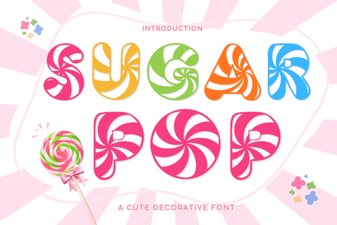 Sweet and Playful Typography for Creative Projects
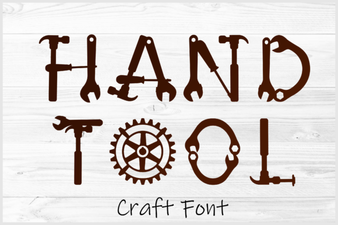 Hand Tool Font: Craft-Inspired Typography for Designers
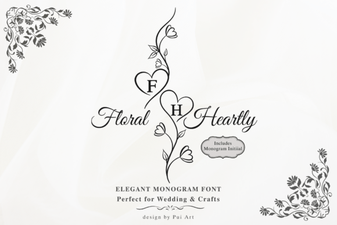 Floral Heartly Monogram Font: Elegant Designs for Creative Projects
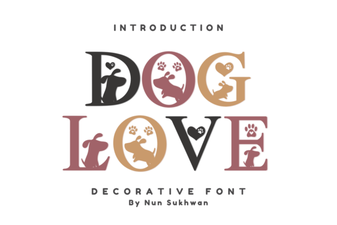 Pawsitively Charming Dog Fonts for Creative Projects
 Rustic Farmhouse Breakfast Font Duo for Charming Designs
 Beautiful Disney Duo Font – Elegant Script Font Collection